Your meeting notes,
done for you.
Press record, and get a full transcript with speaker labels, decisions, and action items - automatically.
Your meeting.
Already written.
In under 60 seconds, Kribe turns any conversation into clear, structured notes — automatically.
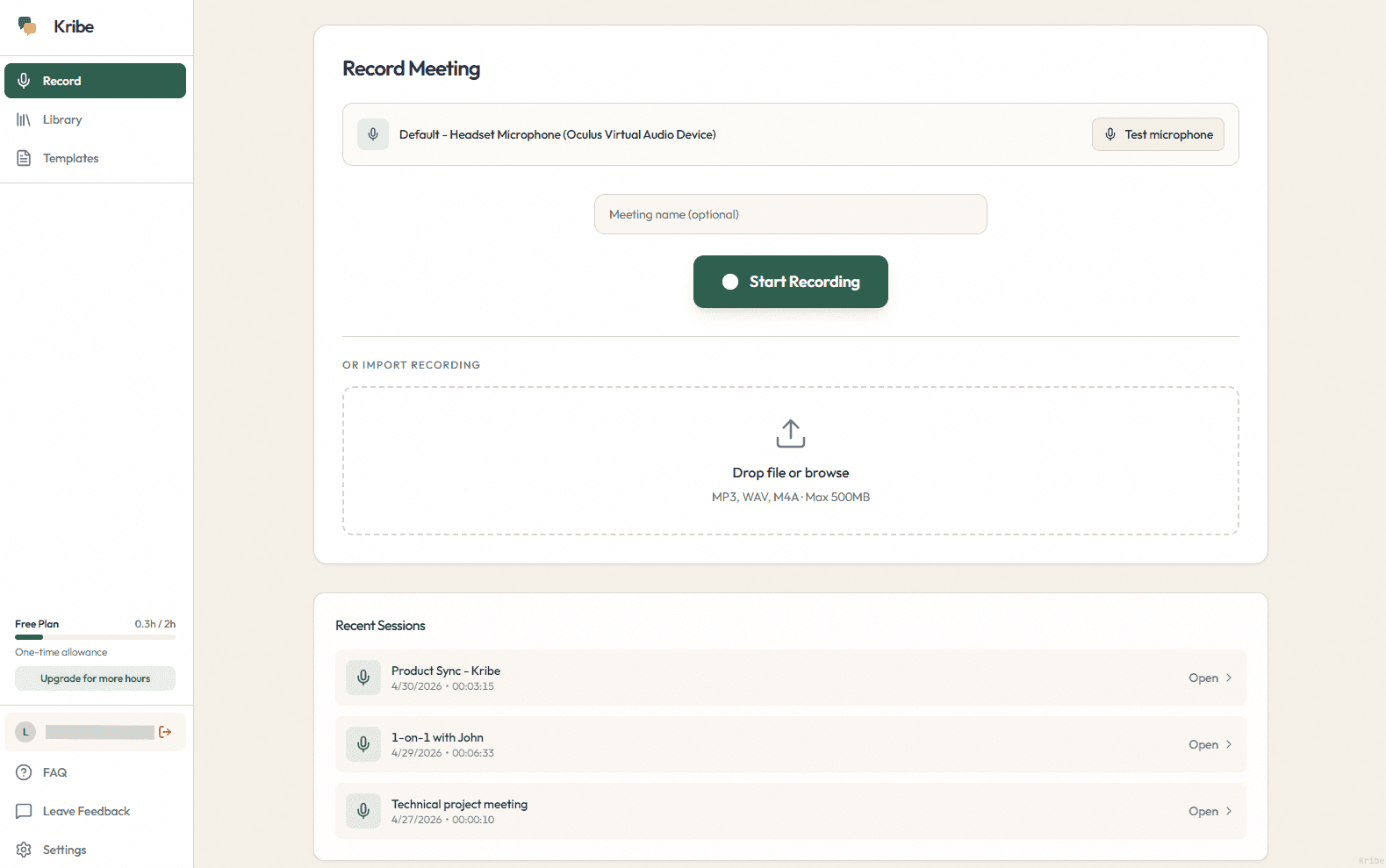
Press record
Kribe captures audio from your microphone or computer speakers. Works for in-person meetings and calls. You can also upload an existing audio or video file.
We transcribe everything
Your audio is processed by an AI speech recognition service that identifies different speakers automatically. Kribe supports multiple languages and handles accents well.
We turn it into real output
AI reads the transcript and produces structured notes: a summary, key decisions, action items with owners, and open questions. You choose the format.
Find anything later
All your meetings are stored locally on your device. Search by keyword across every transcript and summary you have ever made.
The result
Nothing to worry about and no missed details.
Just clear notes you can use immediately.
Try Kribe NowYour meetings are costing you more than you think
The average professional wastes 4–6 hours per week writing up, re-reading, and chasing down what was actually decided in meetings.
You can't focus on the meeting
You're busy typing instead of actually listening.
Writing notes takes too long
Every meeting is followed by 20+ minutes of manual work.
Key decisions get lost
No clear record of what was decided or who owns what.
You forget important details
Context fades quickly after the meeting ends.
How much time will Kribe save you?
Plug in your numbers. See your weekly savings in seconds.
Calculate your time savings
Why Kribe does it better
The difference between a tool that records and a tool that understands.
✕ TYPICAL TRANSCRIBING APPS
Raw transcripts no one reads
Endless walls of text with no structure or outcomes.
Your data goes through the cloud
Most tools process everything on external servers.
Outdated transcription quality
Frequent errors and missed context.
Built for everyone, useful for no one
Generic tools that don't fit real workflows.
✓ THE KRIBE STANDARD
Your data stays on your device
Recordings are stored locally and encrypted — no unnecessary exposure.
Structured, actionable summaries
Clear decisions, tasks, and outcomes from every meeting.
High-accuracy voice transcription
Powered by the latest speech models.
Built specifically for PM workflows
Designed for real meetings, not generic note-taking.
Early users
The summaries come out clean. I don't have to think about how to structure anything — I just read what's there.

I'd been looking for a simple local app to record and transcribe stuff without uploading everything online. This one just works.

The fact that my recordings stay on my own machine is what sold me on it.

Download was 30 seconds and I was getting transcripts immediately. No setup hell.

Tried a few tools before this. Kribe gave the cleanest output for the money.

The summaries come out clean. I don't have to think about how to structure anything — I just read what's there.
I'd been looking for a simple local app to record and transcribe stuff without uploading everything online. This one just works.
The fact that my recordings stay on my own machine is what sold me on it.
Download was 30 seconds and I was getting transcripts immediately. No setup hell.
Tried a few tools before this. Kribe gave the cleanest output for the money.
Simple pricing that pays for itself
Start free, upgrade when you're ready
Free
Start free. Upgrade anytime.
Ideal for: individuals exploring AI notes
- 2h per month
- 30m meeting limit
- Unlimited Storage
Plus
Great for busy professionals.
Ideal for: busy professionals, 20+ meetings/month
- 20h per month
- 2h meeting limit
- More templates
- Standard Support
Pro
For high-volume & power users.
Ideal for: power users & teams with no limits
- 50h per month
- Unlimited meeting limits
- Custom UI Templates
- Priority Support
F.A.Q.
Kribe is a desktop application for Windows. It records your meetings, transcribes them using AI, and produces structured notes with speaker labels, decisions, and action items. A Mac version and mobile app are in development.
Kribe is currently available for Windows only. Mac and mobile versions are planned for the near future.
When you finish recording, your audio is sent securely to Kribe's servers and processed by an AI speech recognition service. The transcript is returned to your device and the audio is deleted from our servers after processing.
Kribe supports many languages including English, Lithuanian, German, French, Spanish, Polish, and more. You can set the language manually before recording or let Kribe detect it automatically.
Your original recording stays on your device. The copy sent to our servers for processing is permanently deleted after the transcript is returned. We never store your audio long-term.
Otter and Fireflies require a bot to join your meeting and work primarily in the cloud. Kribe is a local desktop app with no bots and no calendar integrations required. You just press record.
No. Your meeting data is processed securely and is never used to train AI models or shared with third parties for that purpose.
Yes. Kribe works great for in-person meetings. Just open the app, press record, and it captures the room audio through your microphone. This is one of the main use cases Kribe was built for.
Yes. You can export summaries and transcripts as PDF or DOCX files. The formatting is clean and ready to share.
Yes. The free plan includes 2 hours of transcription per month with no credit card required. It is a permanent free tier, not a time-limited trial.
Not yet. We are working on integrations with popular tools. If you have a specific request, reach out to our support team.
Stop rewriting meetings.
Join thousands of teams who use Kribe to stay aligned — automatically.
Free plan available. No credit card required.
Start for Free →